3 minute read

Density 1.0 is a color grading and film emulation plugin for Final Cut Pro on Apple silicon Macs. Launch price is $169, with a free seven-day trial.
Density 1.0 is an interesting new color grading plugin for Final Cut Pro on Apple silicon Macs, developed by filmmaker and YouTuber Pascal Basel, which looks to bring a complete color grading workflow to the app.
Basel has edited in Final Cut Pro for more than 12 years. “What I wanted was a properly color-managed pipeline inside Final Cut Pro, with film emulation that works in both HDR and SDR,” he says.
Here is how the workflow runs.
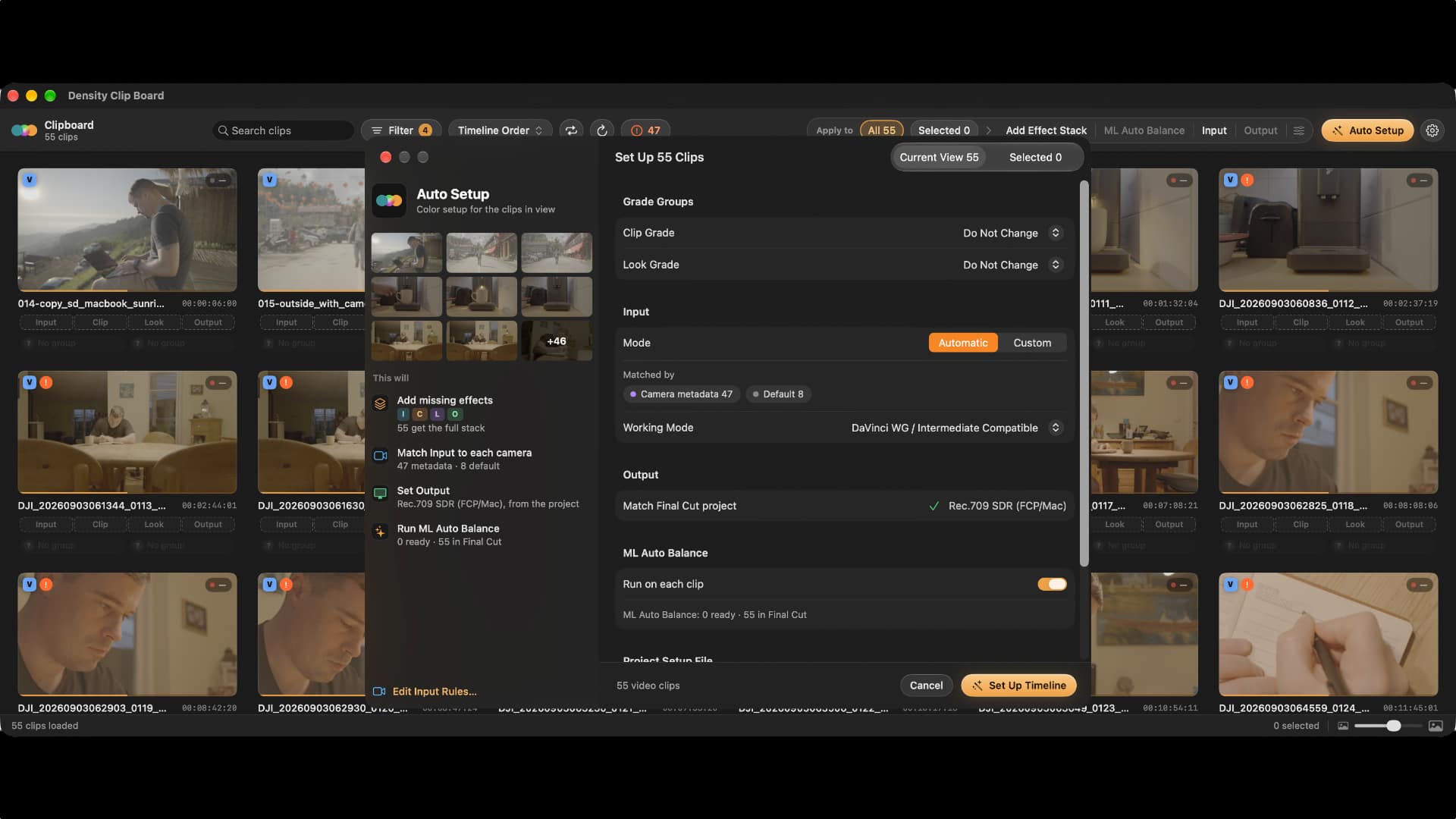
Set up the timeline. Clip Board lays out every clip in the edit as a card, which lets editors locate and pick shots without searching the timeline by hand. Effects, groups, and looks can go onto a chosen set of clips, onto everything in the current view (once a search or filter has been applied, say), or onto the full timeline. Auto Setup handles all of it in a single step. It adds the effects, detects each clip’s Log profile and applies the matching input transform, sets the Output from the project, creates the groups, and, if selected, applies ML Auto Balance, an editable starting point for exposure and white balance.
Assemble your own effect stack. Editors choose which effects each clip receives. Within Add Effect Stack and Auto Setup, they select from Density’s four main effects (Input, Clip Grade, Look Grade, and Output) and can place Density Tools or Final Cut Pro’s native color effects, Color Wheels for example, between them. Set as Default saves the stack for the next run, and it can be applied to a chosen set of clips, to everything in the current view, or to the full timeline.
Convert each camera. Input sits first in every clip’s effect chain. It transforms the camera’s flat Log footage into the working color space, applying the input transform that corresponds to the camera’s Log profile. For many cameras, Density reads the Log profile from the file, so every clip is assigned the correct transform automatically. The plugin ships with 27 camera Log profiles. For the remainder, an Input Rule, such as “file names containing SL3 are Sony S-Log3,” does the job. Grade Health marks clips that have an incorrect Log profile or a missing effect, and provides a fix.
 Grade scenes as a unit. Groups allow related shots to share a single grade with no adjustment layers. In Clip Grade, a group shares corrections wrapped around each clip’s own layer, which means an outlier shot can still be corrected individually. In Look Grade, the group shares the entire look. Primaries, wheels, curves, and Hue / Sat / Luma (which adjusts one color at a time) live in Final Cut Pro’s Inspector, where masks and keyframes behave as they normally do.
Craft the look. Color Style points a shot’s colors in a particular direction. Tint assigns palette colors to different tonal ranges, for instance teal in the shadows and orange in the highlights. Pull shifts the colors already present in the shot toward the palette. Shades and Greens fine-tune individual colors and foliage, and Protect Neutrals and Protect Skin keep grays clean and skin looking natural.
Film Lab constructs film emulation as a negative printed onto a print stock, selected from 57 film stocks, with push / pull processing and printer lights that set the print’s color balance. The 72 bundled presets fill these controls, and a completed look can be exported as a LUT.
Add finishing tools. Seventeen Density Tools, each handling one task, work as individual effects on any clip:
Deliver in SDR and HDR. Output readies the finished grade for its target display: Rec.709 SDR, P3-D65, Rec.2020 PQ, or Rec.2020 HLG. All cameras are graded in a single wide working space, either DaVinci Wide Gamut or ACES, so a new delivery format calls only for a new Output setting.
 Density is a perpetual license sold at density.film for $269, with a launch price of $169 until November 29. Anyone who activates a free trial by then keeps it through their seven-day trial. The trial includes every feature, with no watermark and no credit card required. Each license covers personal and paid client work on two Macs and includes 24 months of updates. After that, an optional $39 Update Pass adds 12 more months. Refunds are available within 14 days.
Density requires an Apple silicon Mac (M1 or later), macOS 26.6 or later, and Final Cut Pro 12.4 or later. It is not available for Intel Macs or Final Cut Pro for iPad.
Tags: Post & VFX Apps & Software Colour Grading Density


RedShark 2020 @ All rights reserved.

Comments