If you have an M5-powered Mac, you can now edit and grade in up to 32K with DaVinci Resolve. There are plenty of other enhancements in the latest software release too.
32K support on Apple M5 Macs is easily the headline-grabbing feature on the latest 20.3 version of DaVinci Resolve, but it's far from the only thing worthy of attention. As well as that, there are some decent workflow enhancements as well. The new update improves timeline versioning with custom naming, and adds new metadata fields in the media pool.
"32K? Who would need that?" you ask. A growing number of people working with LED volumes, projector-driven domes, custom-ratio digital signage, high-end VFX and more, is the answer. Plus, obviously, reaching beyond 4K is going to be rather handy for anyone working with Blackmagic URSA Cine 17K 65 footage.
In fact, 32K workflows have been supported in the paid version of the software since DaVinci Resolve Studio 17 back in 2021. As far as we know, though, this is the first time it's been added to the free release.
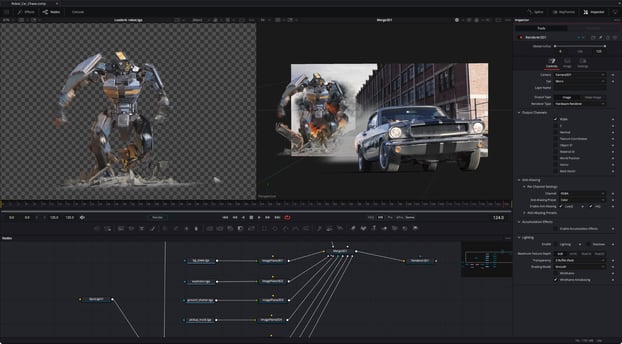
As is customary, Fusion has been updated too. Fusion Studio 20.3 improves 3D rendering of shadow, reflect, and refract layers, as well as improving the loading behaviour of Open FX plugins and the ping pong effect in spline editor.
Details on both below, covering the new features and the usual round of bug squashing. And, as ever, the new software can be downloaded from the Blackmagic Support page. There's also a new version of DaVinci Resolve for iPad 20.3 available today.
What's new in DaVinci Resolve 20.3
The following features have been added or updated.
- Up to 32K resolution support with Apple M5 processors.
- Improved performance for Resolve FX Noise Reduction.
- Timeline backups now allow named snapshots for versioning.
- Support for adding metadata fields as media pool bin columns.
- Media Pool metadata ALE import and export support.
- Option to create custom metadata for unknown fields on import.
- Exported metadata files now include custom metadata fields.
- Media pool views and state are now retained for each project.
- Edit menu action to insert gap at playhead.
- New assignable key shortcut in media pool to start a search.
- Assignable key shortcut for open in timeline with source viewer.
- Speed change and duration change actions now follow sync lock.
- Added 2.39 and 2.40 broadcast safe aspect ratios.
- Alpha support for film look creator, film damage and analog damage.
- Support for IMF workflow for HDR Vivid and Audio Vivid.
- Ability to embed HDR10+ metadata in QuickTime and MP4 encodes.
- Ability to set stereoscopic mode in clip attributes for MXF clips.
- Improved match frame behavior for clips with negative speeds.
- Addressed missing clip actions in subtitle caption context menu.
- Addressed intermittent lag when using stacked timelines.
- Addressed source timeline not restored when switching back to edit.
- Addressed issue tracking with high-quality deinterlace in Fusion.
- Addressed issue with immersive world pose if using Fusion tools.
- Addressed issue loading some deep OpenEXR files.
- Addressed decode issues with compressed ARW clips.
- Addressed AI Music Remixer muting audio on macOS 26.1.
- Addressed possible QuickTime decode hang on Windows.
- Addressed Remote Monitor start up issue on Windows.
- General performance and stability improvements.
Note: Starting from DaVinci Resolve 20.3, OpenCL mode for GPU processing is no longer supported on macOS.
What's new in Fusion Studio 20.3
The following features have been added or updated.
- Improved 3D rendering of shadow, reflect, and refract layers.
- Addressed issue with loading some Open FX plugins twice.
- Addressed issue with some ping-pong splines.
- Addressed issue closing Fusion with Python 3.14 installed.
- Addressed issue with Magic Mask 2 tracks leaking memory.
- Addressed issue with viewer overlays sometimes not updating.
- Addressed issue with Planar Transform when proxy scaling.
- Addressed issue with tool names when importing FBX twice.
- General performance and stability improvements.




Comments