
2 minute read
Advertisement
Building on the performance breakthroughs of VEGAS Pro 21 and 22, the NLE's development team has now officially named its advanced processing architecture the VEGAS Core Engine. And it delivers on quite a lot of new features.
Plenty of new features and capabilities in the v23 release of VEGAS Pro, and we're a bit behind the curve on this one thanks to the distorting effect of IBC. So, diving straight in...
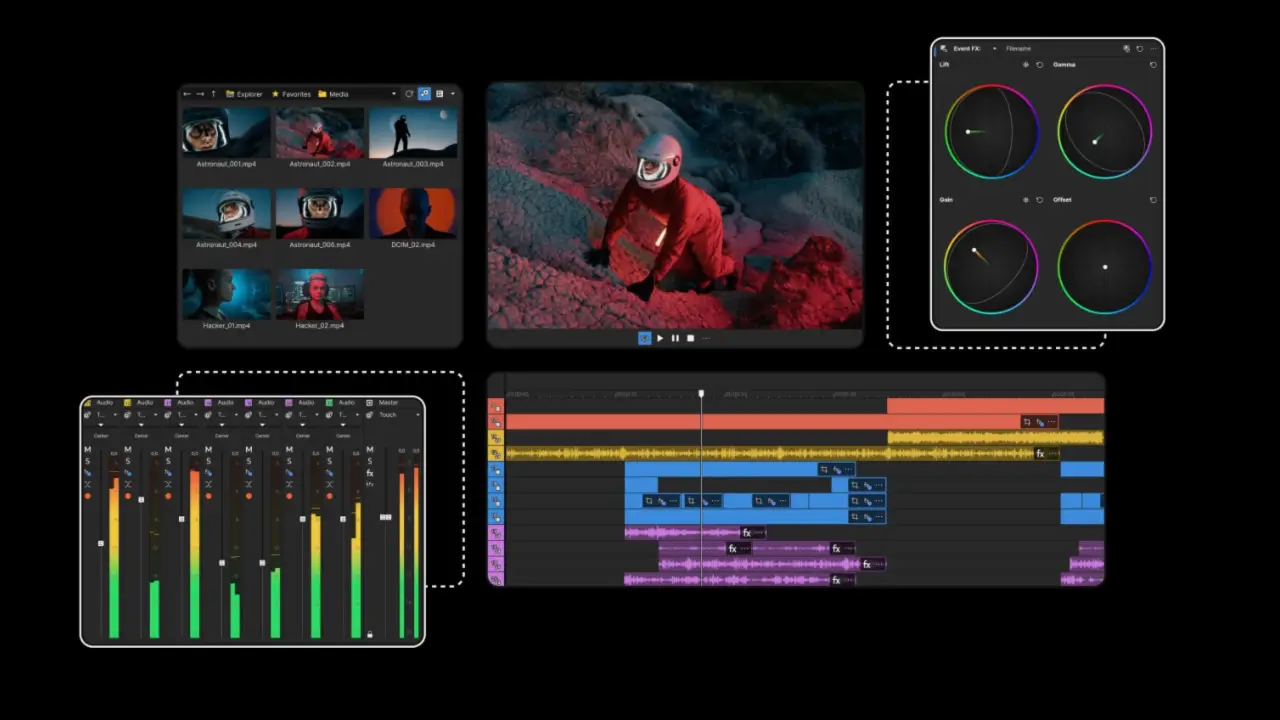
That new VEGAS Core Engine introduces DirectX-based GPU acceleration for color grading and a redesigned DX-based image pool for faster frame transfers. These should eliminate copy steps and enable what the company refers to as 'butter-smooth editing', even in complex multi-track projects.
A reimagined Color Grading Panel now functions as a dockable window for completely flexible workspace layouts. The software has been designed to enable single-screen workflows with an always-accessible timeline that provides direct access to all important tools and functions. Enhanced controls, ACES 1.3 support, and new Samsung Log & Apple Log camera LUTs help ensure pro-grade color reproduction even with footage from mobile devices.
Event and track FX (OFX) envelopes (released in beta) enable users to work directly in the timeline with familiar editing techniques that provide precise and efficient effect animation. Creators can set and adjust animation keyframes and control the transitions between keyframes with in-place envelopes and Bézier curves to ensure smooth animation.
VEGAS Pro 23 and VEGAS Pro Suite 23 (which adds SOUND FORGE Pro, ACID Pro, the Vintage Effects Suite, and Studio Box Mk II) start at $19.99 and $24.99 a month respectively. Annual subs takes 40% off that cost, while they are also available for a one-off lifetime payment of $219 and $269.
Tags: Post & VFX VEGAS Pro NLE

Written by RedShark News Staff
Advertisement
Advertisement
Advertisement
Advertisement
Advertisement
RedShark is a multiplatform online publication for anyone with an interest in moving image technology and craft. With over 50 contributors worldwide, full-time developers, editorial, sales and marketing staff, it is the go-to site for informed opinion and know-how for the quickly changing video, film and content creation industries.

RedShark 2020 @ All rights reserved.

Comments