
2 minute read

Threadline is a web-based AI editing workspace that uses intonation analysis to build narrative assemblies from interview footage, with native XML export to Premiere, DaVinci, and Final Cut Pro.
Threadline Studio is one of the latest entrants into the increasingly crowded AI assistant editor workspace. It does seem to be doing something a bit different, though, in starting off by targeting the production of a first assembly at the interview-heavy, documentary, corporate, and branded content end of the production market. Most other products in this field are building in that direction from a social-clip cutdown entry point.
The company was founded in 2025 by Jacinto Salz, who spent ten years as a director and DP across documentary, corporate, and branded content, and Bradley Smith, whose background is in large-scale video infrastructure engineering. Its main differentiator is what it calls its intonation analysis engine. Where most AI editing tools make cuts on word boundaries or silence gaps, the company explains that Threadline evaluates rhythm, cadence, pacing, and emphasis of speech to place cuts more where a human editor would.
The practical upshot is that when a subject trails off mid-thought and picks up again a few seconds later, the tool recognizes the pause as part of the thought and holds the moment intact rather than cutting on the silence. The result should be assemblies that need less repair work once they land in an NLE.
Slightly more controversially, the company also highlights the software’s ability to help construct frankenbites, composite quotes from separate utterances. These can be very useful in corporate work, but are seen as more of a dark art in documentary projects.
Export delivers native XML to Adobe Premiere Pro, DaVinci Resolve, and Final Cut Pro with clips, structure, and timing intact.
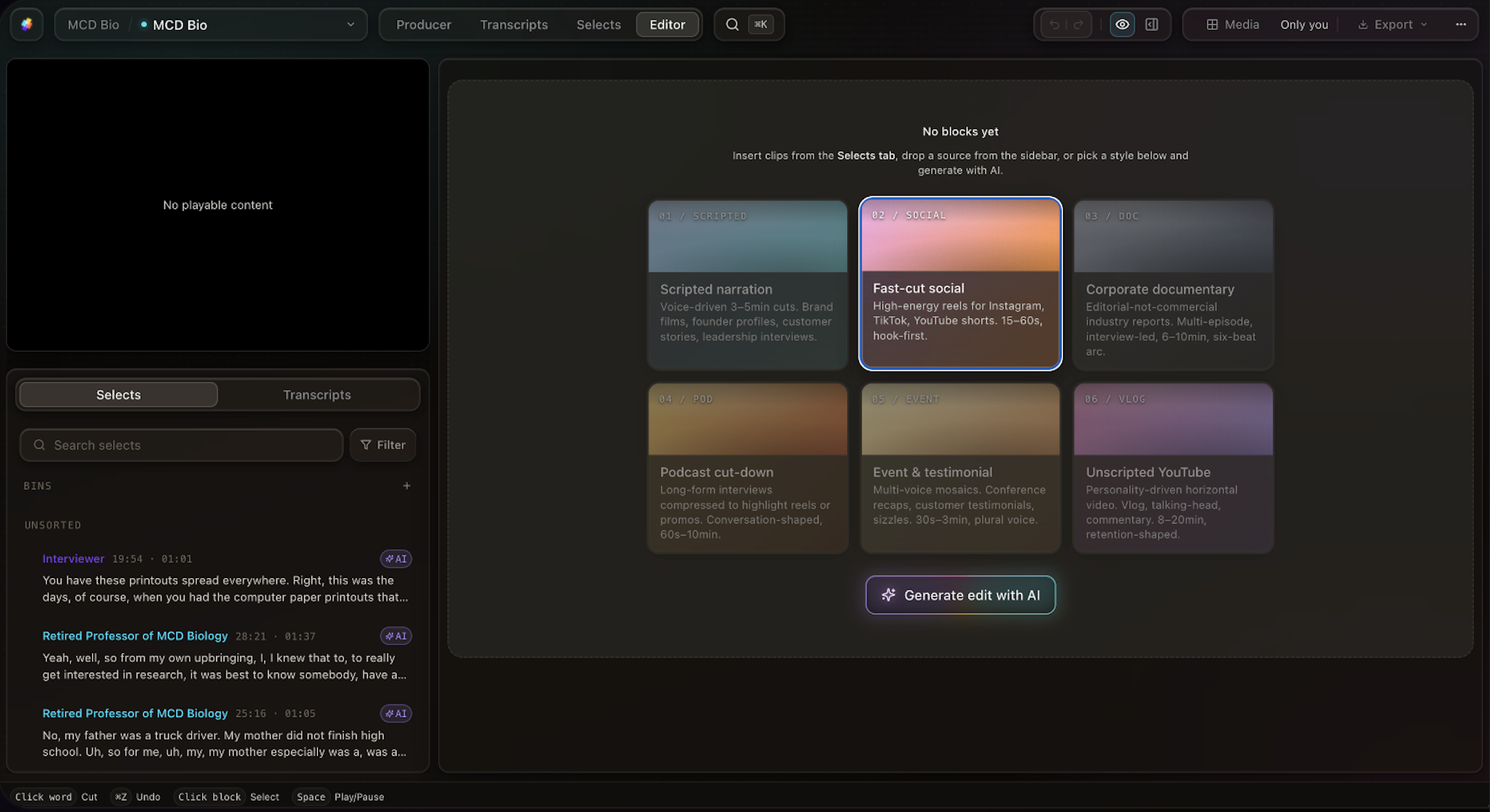 Threadline also features six custom templates to give users fast starts
The workflow runs across four purpose-built workspaces. Producer is where editors define project scope and brief the AI engine; Transcripts handles automatic transcription with speaker detection, letting editors navigate footage by what was said rather than by timecode; Selects lets editors tag moments directly from the transcript and organize them into bins at the word level before any assembly starts; and Edit is where sequences are built manually or generated by AI using a library of skills tuned to specific output types, before being reviewed and reordered.
An AI chat assistant has been built that runs across all four workspaces, giving users continuity and full project visibility.
Pricing runs across three tiers.
The free tier includes 15 AI credits, 10 GB storage, 1080p export, and automatic transcription with team collaboration.
Threadline PRO costs $24/month (annual) or $29/month, adding 50 credits per month with 30-day rollover, 1 TB storage, 4K export, XML export to all three NLEs, share links for external review, and a 25 GB per-file upload limit; credit top-ups are available at $35 per 50 credits.
Threadline STUDIO, priced at $95/month (annual) or $114/month and listed as coming soon, adds 150 monthly credits with rollover, 4 TB storage with no per-file limit, ProRes, DNxHR, MXF, and RAW support, multi-cam sync, b-roll analysis, local processing for unlimited local footage, a macOS desktop app, and unlimited XML export.
AI generation costs 3–5 credits per generation across all tiers, so it will be worth making careful choices before pressing the go button, especially if evaluating the free tier.
Tags: Post & VFX AI Editing Threadline


RedShark 2020 @ All rights reserved.

Comments