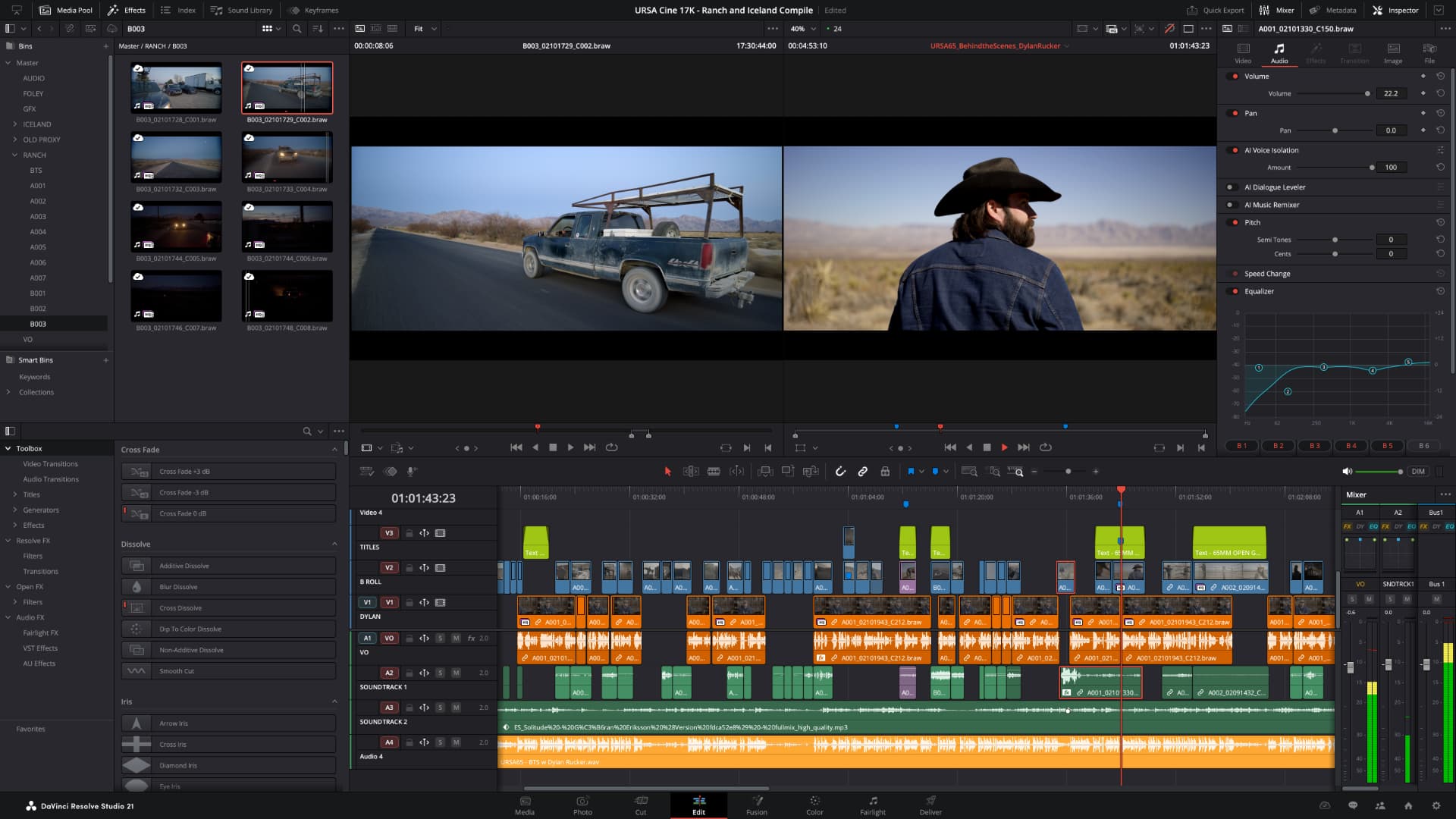
Blackmagic Design has managed to get the final release version of DaVinci Resolve 21 out of the door in record time, a mere seven weeks after the beta was announced at NAB 2026.
Blackmagic has released the final version of DaVinci Resolve 21, a record seven weeks after first announcing the new software at NAB. Frankly, we should have been paying more attention to the rapid release cadence of the betas, not to mention what happened last year.
All the same, DaVinci Resolve 21 is the most rapid journey from beta to final yet. Here’s how the release schedule has evolved in the post-COVID period.
|
Version
|
Announced
|
Final Release
|
Public Betas
|
Beta Period (weeks)
|
|
v18
|
April 18 2022
|
July 20, 2022
|
6
|
~13
|
|
v18.5
|
April 17 2023
|
July 20, 2023
|
5
|
~13
|
|
v19
|
April 12 2024
|
August 22 2024
|
5
|
~18
|
|
v20
|
April 4 2025
|
May 28 2025
|
4
|
~8
|
|
v21
|
April 14 2026
|
June 2 2026
|
4
|
~7
|
Whether this is a good thing or not is a question for the user forums. A couple of users we’ve spoken to have expressed more than the usual frustration with Resolve bugs over the past few weeks, and it was notable that beta 3 had to squash a lot down. Hopefully the rapid release of beta 4 and then this final version is a sign of confidence that the bug hunt was successful rather than a case of “ship it and patch it”.
Confirmed in v21.0
So, in case you haven’t been keeping track, here’s the complete list of everything that’s new in DaVinci Resolve 21.0, DaVinci Resolve Studio 21.0, and Fusion Studio 21.0 from Blackmagic's own release notes. The list of additions in the paid-for Studio version is useful for anyone deciding whether to make the jump.
As always, all downloads are available for free from Blackmagic Support.
DaVinci Resolve 21.0
This software update installs the final release of DaVinci Resolve 21 which adds support for new Fairlight folders, improvements for keyframing, MultiMaster trim passes and layer list node graphs. This update also adds support for the new Photo page for still images.
The free version of DaVinci Resolve 21 includes all of the same high quality processing as DaVinci Resolve 21 Studio and can handle unlimited resolution media files. However it does limit project mastering and output to Ultra HD resolutions or lower and only supports a single processing GPU on Windows and Linux.
If you need features such as support for multiple GPUs, 4K output, motion blur effects, temporal and spatial noise reduction, multiple AI-based tools, HDR tools, camera tracker, voice isolation, surround sound and immersive audio, multiple Resolve FX, 3D stereoscopic tools and remote rendering, you’ll need to upgrade to DaVinci Resolve 21 Studio.
The following features have been added or updated.
Photo Page
- New photo image editing now fully integrated within DaVinci Resolve.
- Image library with tagging, favorites, ratings and album collections.
- Albums let you build, manage and tweak photos at source resolution.
- Native RAW support for major camera formats.
- Import media from Apple Photos on macOS.
- Import Lightroom Catalog files into the media pool.
- Use Resolve multi-user collaboration and Blackmagic Cloud syncing.
- Support for DaVinci color control toolset and grading panels.
- Looks, LUTs, ResolveFX and OpenFX for your images.
- GPU accelerated batch exports and conversions.
Cut and Edit Page
- Keyframing provides powerful retime controls with 4-point bezier.
- Keyframe and add curves for multiple selected clips.
- Keyframing ease options, loop, ping pong, reverse and stretch.
- Keyframe Fusion effects, generators and text along with edit effects.
- Subframe support for keyframing and markers.
- Native support for OGraf HTML graphics.
- Native support for Lottie animations.
- Resolve FX Picture in Picture effect.
- Font browser window for text and subtitle elements.
- Preview fonts during font selection as a preference.
- Spell checking for all text elements.
- Emoji and color fonts for Text+ and MultiText.
- Multicam angle previews in clean feed and video outputs.
- Multicams can include all audio tracks for each angle.
- Multicams can use full clip extents on creation and during sync.
- Replay control to limit view to the last 5 minutes of recorded media.
- Replay editor allows timeline selection from search dial.
- Replay now allows independent start and end stingers.
- Replay title palette allows up to 6 favorite titles.
- Mono audio now plays on left and right channels of stereo tracks.
- Improved waveforms, markers and fades for short edit tracks.
- Source timelines support auto track selectors.
- DRT timeline import supports link and conform options.
- Compare timelines with timeline backup snapshots.
- Subtitle inspector now supports search and replace.
- Edit page lets you show or hide tracks from the index.
- Support for editing EDL clip name in the edit index.
- Affinity .af file support with group and individual layer control.
- Edit page timecode options for frames, subframes or audio samples.
- Duration timecode option to show duration for clip selection.
- Improved timeline view options with presets and clip name option.
- View remote color versions in the source viewer.
- Local color grade versions use remote grades on new clip creation.
- Timeline menu action to select transitions in the cut and edit page.
- Paste and remove attributes for clip color, markers and flags.
- Paste and remove attributes to retain image position under crop.
- Switch audio channels for multi-clip selections via the context menu.
- Edit page source tape includes multicam clips.
- Match frame finds source media for nested clips and multicams.
- Resolve FX Video Collage with separate tile fill and border controls.
- Subtitle support for fade in and out.
Media Pool and Metadata
- Support for tabbed layouts.
- Thumbnail, list and metadata views can be set for each bin.
- Star rating support for clips.
- Cut page supports smart bin views.
- Export media bin thumbnails as a PDF.
- Automatic smart bin and clip filter for offline clips.
- Custom metadata for smart bins, filters, data burn and naming tags.
- Customize your project poster frames.
- Show input colorspace and gamma in metadata view.
- Transcription column support in list view.
- Custom keyboard shortcuts to set thumbnail, list or metadata views.
- Ability to reset audio clip attributes to the original configuration.
Color Page
- Clip groups now support grade versions.
- Node graphs can now be viewed as a layer list.
- Node stacks now support up to 8 layers.
- Customizable HDR and nit scopes ranges.
- ACES AMF improvements, with transform name and custom folders.
- Adobe RGB colorspace and gamma support.
- OpenFX 1.5 color management APIs for colorspace aware effects.
- Advanced panel controls for 2.39 and 2.4 safe area aspect ratios.
- Multi-user projects can bypass color management on the color page.
- Pasting tracking data between power windows retains original shape.
Fairlight Page
- Folder tracks allow a group of tracks to be folded down or expanded.
- Go to mouse pointer support using the C key.
Fusion Page
- Support for Krokodove motion graphics effects.
- Over 100 new motion graphics effects and tools.
- New Macro Editor with inspector view and publishing to edit effects.
- Fusion animation can be creatively driven by Fairlight audio.
- Native support for OGraf HTML graphics.
- Native support for Lottie animations.
- Text+ and MultiText support spell checking.
- Font improvements include emoji, color fonts and more.
- Improved MultiText for position, pivot, alignment and CSV import.
- Support for USD SDK 25.11 with Hydra 2.0 API for Storm renderer.
- USD support for 3D matte objects and textures.
- Support for USD Texture Projector and Catcher.
- Global in-out controls for USD Loader.
- Native support for creating Relief Maps.
- Change inspector properties for multi-tool selections.
- Change common inspector values in all selected multi-tool layers.
- User defined metadata variables in paths, expressions and scripts.
- Lens Distort offers checkerboard calibration and GPU acceleration.
- Guides and rulers persistence, presets and improved snapping.
- MediaIn nodes show clip name.
- Open keyframes and spline as a new window.
Codecs and I/O
- Enhanced MXF growing file support for broadcast workflows.
- MXF OP1A support for MPEG2 bitrate and other encode options.
- Canon CR3 RAW decode support.
- Panasonic Lumix RW2 RAW decode support.
- Fujifilm RAF RAW decode support.
- Apple ProRAW decode support.
- Support for compressed ARW from Sony A7V and newer cameras.
- Improved Nikon NEF RAW decode support.
- HDR decode support for HEIC, JPEG, PNG and TIFF images.
- HEIC encode support on macOS and Windows.
- HDR encode support for HEIC, JPEG, PNG and TIFF images.
- Support for Insta360 I-Log in color management.
- Improved EXIF metadata support for stills formats.
- Support for Sony Burano V3 clips.
- Intel QuickSync AV1 4:4:4 decode and encode support.
- Windows ARM H.265 10-bit 4:2:2 decode support.
- Per render job option to override RCM or ACES outputs.
General Improvements
- Powerful, expanded and flexible data burn-in window.
- Preferences and project settings can now be searched.
- Multi-user projects support dynamic project switching.
- Remote monitor app available with DaVinci Resolve on Windows.
- Support for importing and exporting Final Cut Pro 12 FCPXML.
- Up to 3x faster file sync performance to Blackmagic Cloud.
- General performance and stability improvements.
Note: Sony camera control on Windows needs the Sony IEDT application to be installed from the Sony website.
DaVinci Resolve Studio 21.0
This software update installs the final release of DaVinci Resolve Studio 21 which adds support for new AI tools including IntelliSearch, CineFocus and tools for facial refinement. This update also adds support for the new Photo page for still images, Krokodove toolset to Fusion, new Fairlight folders, plus improvements for keyframing, MultiMaster trim passes, layer list node graphs and more. This version requires a DaVinci Resolve Studio license dongle, Blackmagic Cloud license or software activation code.
These are the changes from the free version.
Photo Page
- Direct image capture via Sony or Canon tethered cameras
- Use all of Resolve's native AI toolset including AI IntelliSearch
AI Tools (entire section — Studio only)
- AI IntelliSearch
- AI Speech Generator
- AI CineFocus
- AI Face Age Transformer
- AI Face Reshaper
- AI Blemish Removal
- AI SlateFinder
- AI SlateID
- AI UltraSharpen
- AI Motion Deblur
- Improved AI UltraNR
Cut and Edit Page
- IntelliScript supports Final Draft or plain text screenplay imports
- Faster audio transcription and improved subtitle word timing
- Up to 2x faster AI Speed Warp Metal option on macOS
- Edit page source tape supports stereoscopic 3D clips
Color Page
- MultiMaster trim pass to grade single timeline to many deliverables
- Render Magic Mask in place as an external matte
- Film Look Creator adds Aurora preset and contrast roll-off controls
- Film Look Creator softness controls support for film gate
- Shared node support for stereoscopic 3D clips
- Multiple HDR Vivid improvements, including mini panel controls
- Reset Dolby Vision and HDR analysis from the option menu
- Motion Blur option for Metal on macOS
Immersive and VR Workflows (entire section — Studio only)
- Apple Immersive workflows now support foveated rendering
- Initial VR180 and VR360 standard immersive workflow support
- View VR180 and VR360 source clips as immersive or viewport
- Mix and match VR180 and VR360 in immersive timelines
- Standard immersive timelines support immersive transform controls
- VR180 and VR360 deliver presets for Meta Quest and YouTube
- LatLong patcher allows customizable field of view
- Fusion adds Panomap immersive rotation and ILPD retargeting
Fusion Page
- 3D Renderer support for Cryptomatte
- Multilayer support for stereoscopic 3D clips and deep images
- Color correction for deep images in Fusion
- Vector channel support in multilayer workflows
- Up to 2x faster Relight tool
- Up to 6x faster Depth Map tool
- Support for remote monitoring of Fusion previews
Codecs and I/O
- HDR Vivid supplementary IMF ISXD package support
- MainConcept H.265 and MV-HEVC 4:2:0 and 4:2:2 encode support
- Intel QuickSync H.264 10-bit 4:2:0 and 4:2:2 decode support
- Intel QuickSync AVC Intra decode support
- MV-HEVC decode support on Nvidia systems
- Encode support for multi-output audio only ambisonic formats
General Improvements
- Background renders, quick exports and proxy generation
- Background analysis for transcription and audio classification
- All Scripting API additions (9 entries: IntelliSearch, Slate analysis, Speech Generator, motion blur removal, audio classification, speaker detection, background task disable)
Fusion Studio 21.0
This software update installs the final release of Fusion Studio 21 which adds support for the Krokodove toolset and over 100 new motion graphics effects and tools.
The following features have been added or updated.
- Support for Krokodove motion graphics effects.
- Over 70 new motion graphics effects and tools.
- New Macro Editor with inspector view and publishing to macros.
- Native support for OGraf HTML graphics.
- Native support for Lottie animations.
- Text+ and MultiText support spell checking.
- Font improvements include emoji, color fonts and more.
- Invoke font browser to preview and select fonts.
- Improved MultiText for position, pivot, alignment and CSV import.
- MultiText ability to double/triple click to select and drag selection.
- Support for USD SDK 25.11 with Hydra 2.0 API for Storm renderer.
- USD Support for 3D matte objects and textures.
- Support for USD Texture Projector and Catcher.
- Global in-out controls for USD Loader.
- 3D Renderer support for Cryptomatte.
- Native support for creating Relief Maps.
- Change common inspector properties for multi-tool selections.
- Change common inspector values in all selected multi-tool layers.
- Multilayer support for stereoscopic 3D clips and deep images.
- Color correction for deep images.
- User defined metadata variables in paths, expressions and scripts.
- Lens Distort offers checkerboard calibration and GPU acceleration.
- Vector channel support in multilayer workflows.
- Native support for Fusion on Windows ARM64 systems.
- Open keyframes and spline as a floating window.
- Faster native speed warp in Fusion Studio.
- Up to 6x faster Relight and Depth Map tools.
- Up to 2x faster AI Speed Warp Metal option on macOS.
- General performance and stability improvements.




Comments