3 minute read

Adobe has updated five Creative Cloud apps in one release. Lightroom's Assisted Culling is now generally available, After Effects replaces its Roto Brush, and more. Meanwhile, a new survey from the company looks at contrasting attitudes to AI in the creative industries.
Adobe has released a batch of Creative Cloud updates across Lightroom, Premiere, After Effects, Photoshop, and Illustrator, with new AI-assisted tools covering a whole range of processes from photo culling to rotoscoping.
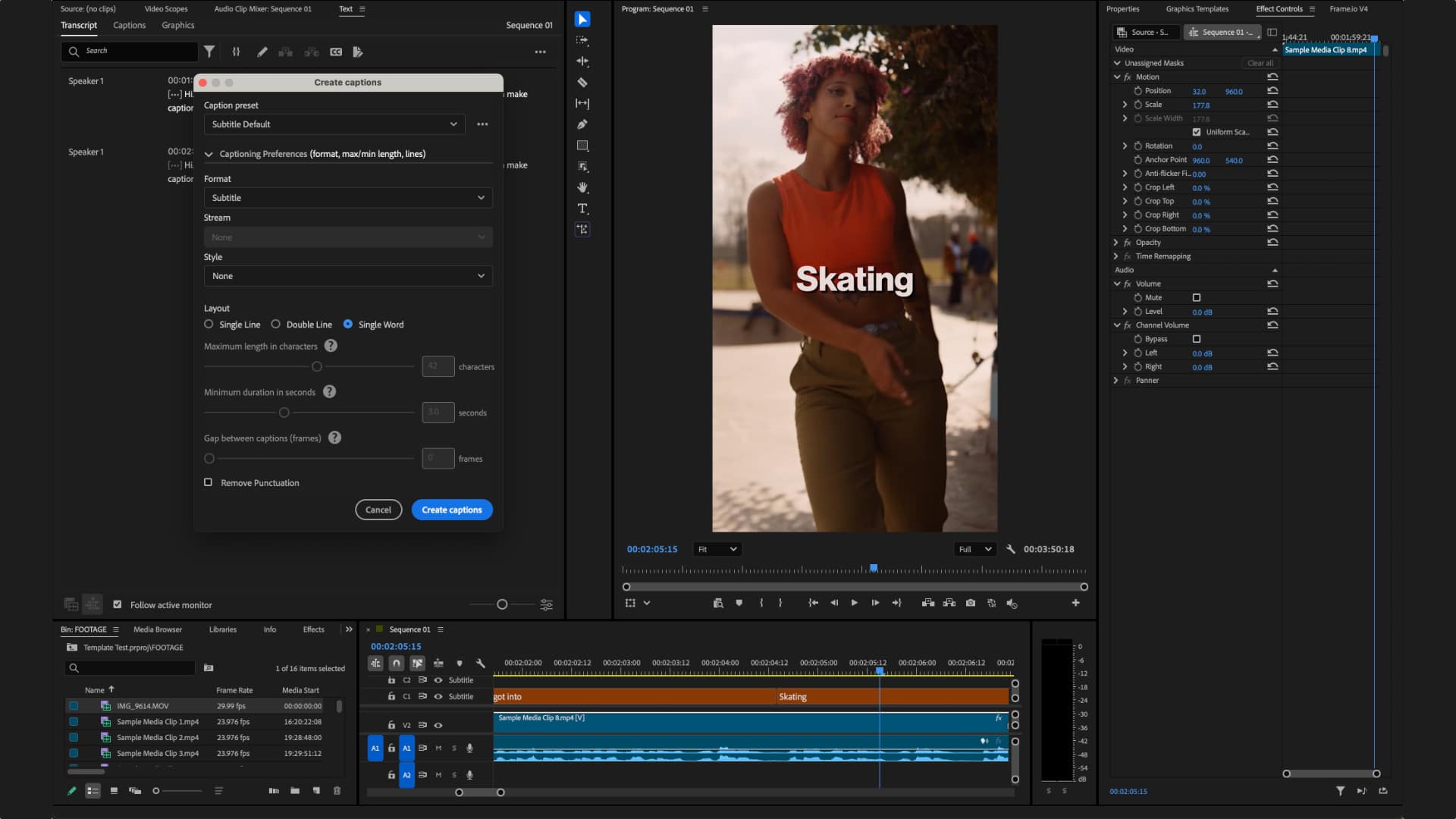 Global Audio Mute silences audio across the entire application in one click. Marker Search retrieves any marker by color or name across all open projects. Three new effects, Channel Blur, Gradient, and Noise FX, handle compositing and animated texture work inside the timeline. New 3D Spinback and Slide transitions include professional easing controls. Single Word Captioning allows edits at the word level without affecting the surrounding caption block.
The Stock Panel Checkout lets users preview and license Adobe Stock assets without leaving Premiere. When multiple assets are brought into a project via Firefly Boards, a sequence is created automatically. Object Mask now produces softer edges and can be regenerated if media goes offline and gets relinked. The Sequence Index Panel consolidates long-form edit controls, while A/V Display Mode shows video and audio waveforms together in the Source Monitor.
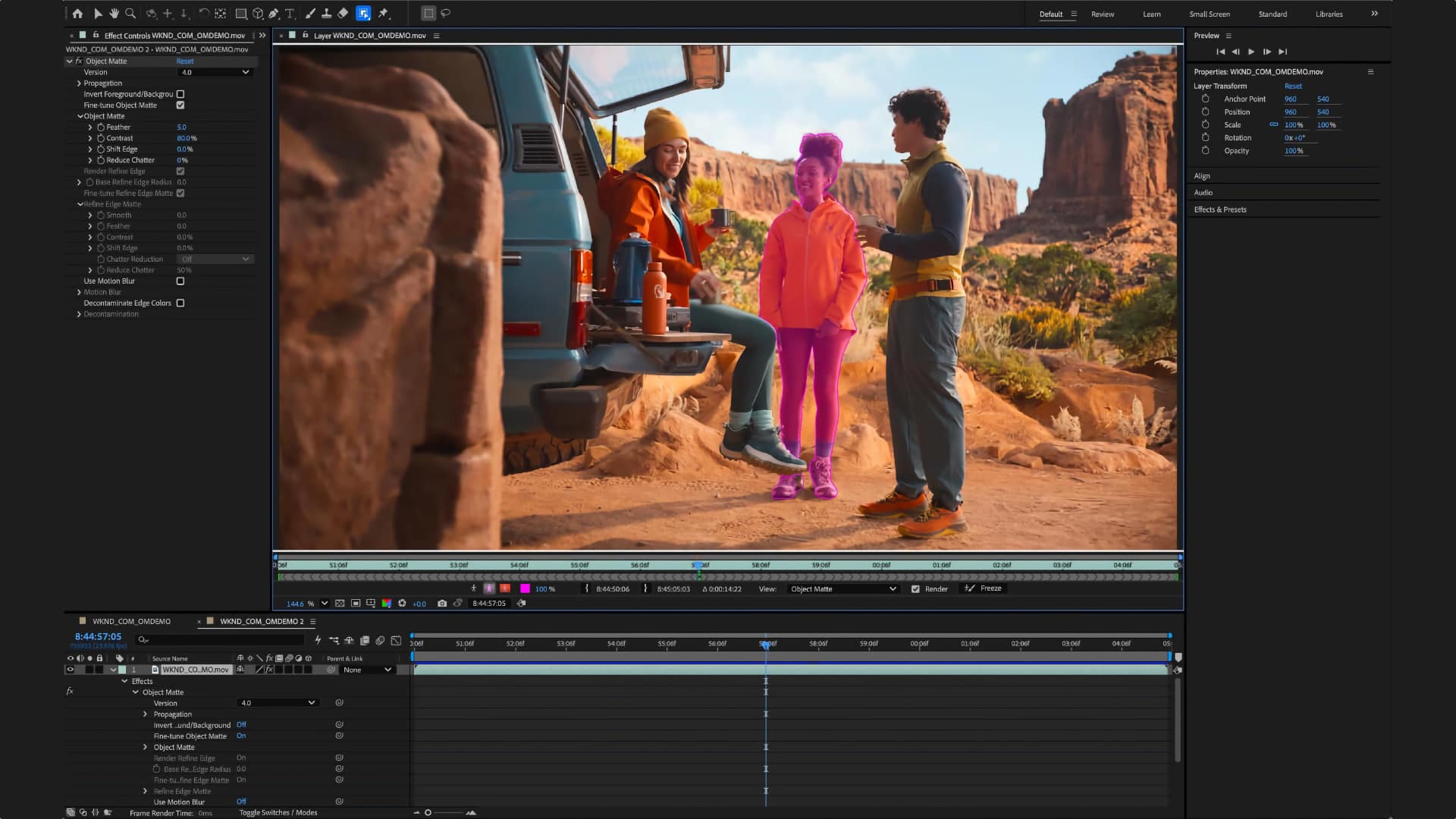
Object Matte replaces the brush-only Roto Brush with four AI tools: Object Selection, Quick Selection, Selection Brush, and Refine Edge. The 3D toolset gains Displacement Maps for surface depth, Depth of Field across models, meshes, text, and shape layers, and scripting APIs for Parametric Meshes. SVG files can now be imported directly as editable shape layers with gradients, strokes, and transparency preserved. A copy-paste workflow from Illustrator brings vector content across without conversion.
 Reflection Removal detects and removes reflections from glass shots, isolating them on a separate layer for nondestructive opacity adjustment. The Remove Tool now runs a generative AI model on-device, functioning online and offline.
Assisted Culling is now generally available after an early access period. The updated feature adds Face View, which isolates individuals in a frame and analyzes eye sharpness and whether eyes are open. Stacking automatically groups near-duplicate images and flags the strongest candidate. Customizable filters, precision dials, and selection overrides give additional control over the process.
Photo to Video converts stills into animated clips using AI-generated motion, powered by Firefly and Google Veo. Users can rely on auto-generated prompts derived from the image or input their own.
AI Sharpen integrates Topaz Labs' Noise-Aware Sharpen model directly into Lightroom without requiring an export step. Sony a7R VI RAW files are now supported across Lightroom, Lightroom Classic, and Adobe Camera Raw.
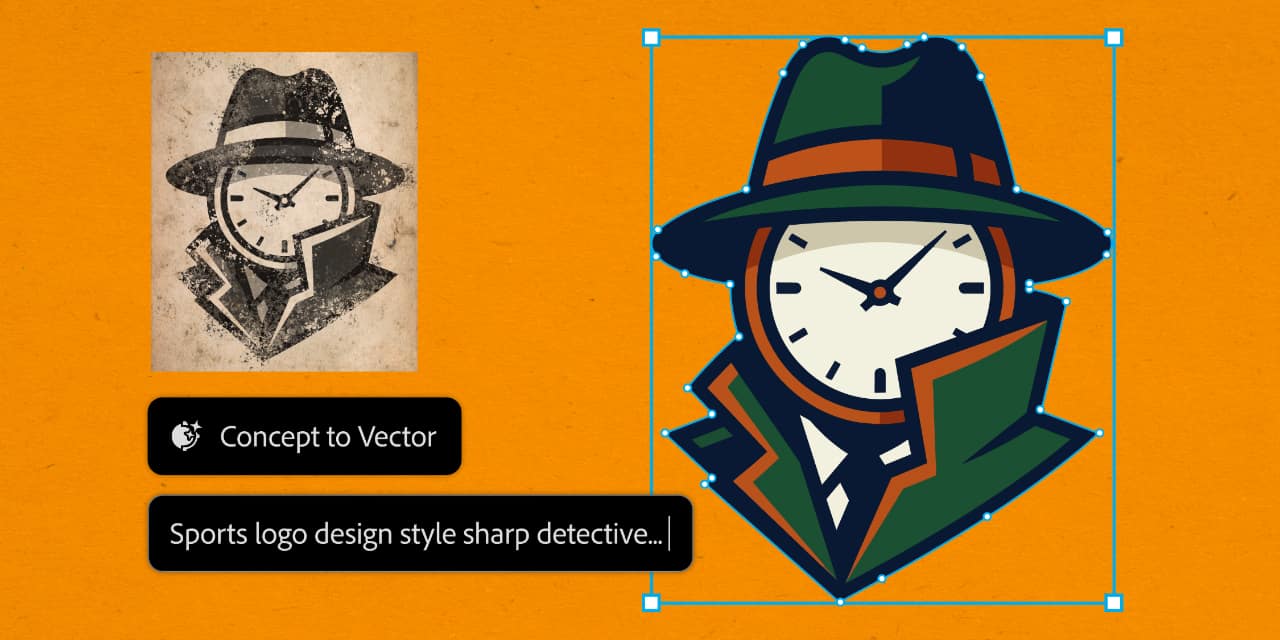 Concept to Vector, previously introduced in Illustrator 30.5, turns sketches or low-resolution assets into editable vector drafts, or generates multiple stylistic variations from a single source image.
All updates are rolling out this week.
The new features come as the latest Adobe 2026 Creators' Toolkit Report is released, which surveys 16,000+ creators across 8 countries to ascertain attitudes to their work and the creative software they use to accomplish it.
As you would expect, AI was front and center of the questions this year, and the responses have five main threads.
AI is now mainstream infrastructure. 75% of creators describe it as integrated or essential to their workflow. 87% say it's grown their business or audience.
Voice and taste are the new differentiator. As AI floods the zone with content, 53% of creators who find it harder to stand out blame sheer volume, and 42% say AI-generated content is burying unique voices.
Speed does not mean publish-ready. 58% say AI has actually helped them compete better against larger teams and 93% say AI helps them work faster. But a very sensible 57% say outputs need moderate to extensive editing before they'd share them. In short, AI accelerates the draft stage, but human judgment determines what leaves the computer.
Creators are open to AI agents handling multi-step tasks, but 85% insist final creative decisions stay with them. The three conditions they want are: ability to review/undo at any point (44%), transparency into what the agent is doing (37%), and clear data-access limits (34%).
Disclosure and copyright remain unresolved issues. 85% say audience expectations around disclosure are rising, but only 49% say they always or often disclose AI use. Meanwhile, 90% say copyright protection for AI-assisted work matters to them. This gap between disclosure expectations and disclosure behaviour, not to mention the still-unresolved question of copyright, suggests the industry has significant ground to cover yet.
Tags: Post & VFX Adobe Adobe After Effects Adobe Premiere


RedShark 2020 @ All rights reserved.

Comments