The new features in DaVinci Resolve 20.2 not only include ProRes RAW support, but also advanced track patching, ripple trim controls, and custom metadata fields.
There's quite a lot of new functionality in the latest version of DaVinci Resolve. So much that Blackmagic has made a dedicated video about it.
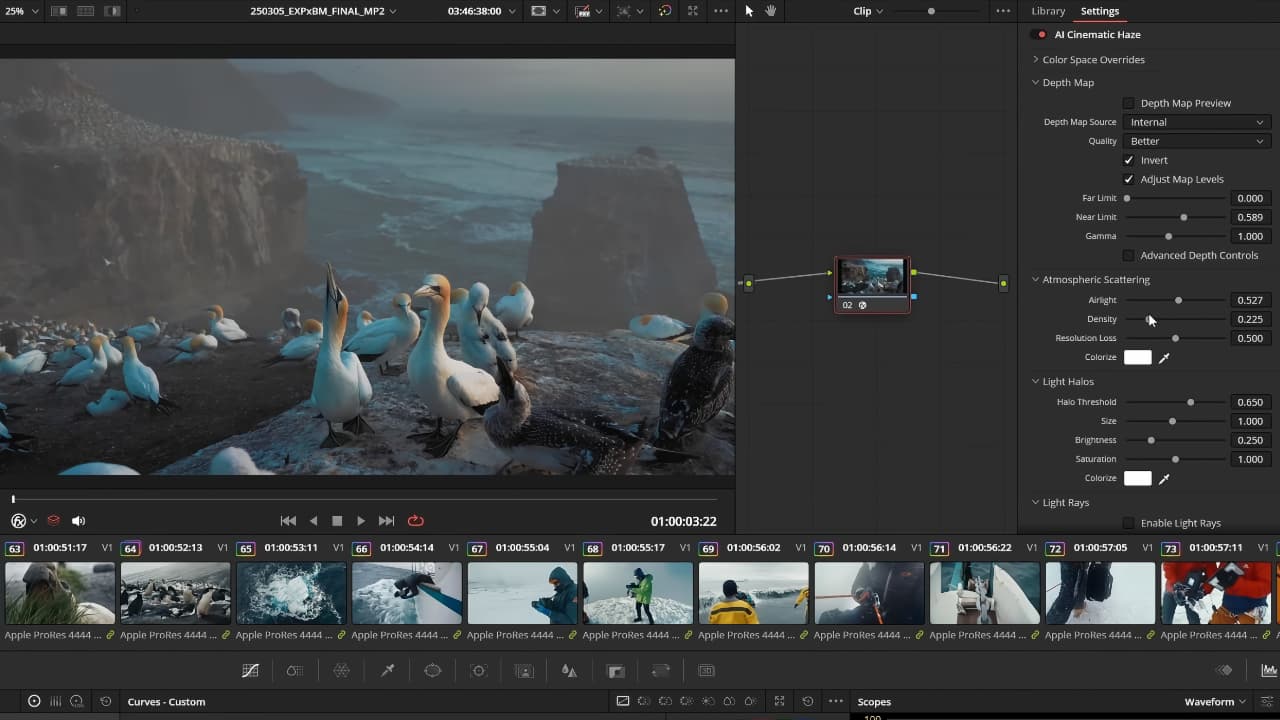
Headline additions include improved track patching and ripple trim controls, alongside custom metadata fields. In addition, there are improved MultiText alignment and transformation controls in Fusion, support for playing Apple ProRes RAW, and a new AI-powered Cinematic Haze effect on the color page. There is also new support for immersive EXR workflows and for streaming immersive content from Fusion directly into Apple Vision Pro.
As ever, it's all downloadable from the Blackmagic support page.
Here's the full list.
What's new in DaVinci Resolve 20.2
The following features have been added or updated.
URSA Cine Immersive Workflow
- Streaming from Fusion page to Vision Pro.
- Support for immersive option in PanoMap.
- Support for immersive world pose rotations and flips.
- Render stereoscopic 3D as full side by side or top-bottom.
- Node stack support for stereoscopic 3D workflows.
- Support for immersive EXR workflows.
Cut Page
- Improved replay stinger transition handling in interlaced timelines.
- Improved replay editor and ATEM switcher feedback cueing replays.
Edit Page
- Sync lock controls ripple edit independently from auto select.
- Improved ripple trimming now preserves sync for edit actions.
- The trim editor now automatically displays when dynamic trimming.
- User preference to switch to single viewer mode for trim editor.
- Improved source and destination patching in the track header.
- Timeline audio menu action to detach synced audio from video.
- Support for adding and populating custom metadata fields.
- Support for flattening multicam clips with speed changes.
- Audio track solo support for the source timeline viewer.
- Source track destination sub menu action to reset to default state.
Cut & Edit page
- Menu actions to move selected keyframes up down left and right.
- Curve and keyframe editor in timeline now includes actions toolbar.
- Shift click keyframe editor headers to toggle multiple parameters.
- Alt click keyframe editor headers to toggle parameters exclusively.
- Guides support individual colors and lock states.
- Switch between pixel and percentage when adding or editing guides.
- Mouse priority for Fusion, transform and effect overlays over guides.
- Voice over countdowns now support audible beeps.
- Editing now preserves audio bus automation.
- Option to ripple delete silence for selected clip.
- Up to 2x faster transcriptions on macOS.
- Up to 2x faster voice convert analysis on macOS.
Fusion page
- Support for editing custom guides in Fusion viewers.
- Improved MultiText alignment and transformation controls.
- Support for animated image inputs for USD tools.
- Multilayer support for 3d renderer.
- Multilayer AoV channel support for USD renderer.
- Up to 2x faster surface tracker performance.
Color page
- New AI based Resolve FX Cinematic Haze.
- Resolve FX light effects support glow from alpha sources.
- Menu action to navigate clips using clip number.
- Ability to reset node color for multiple selected clips.
- Advanced color panels persist side panel states after restart.
- Improved HLG viewer output when using viewer display profiles.
- RCM and CST now use ITU BT.2408 for HLG and PQ conversion.
- Up to 2x faster Resolve FX surface tracker performance.
Fairlight page
- Project settings option to disable soft fades between clip edits.
- Project settings option to set ramp-to-play time.
Codecs & I/O
- Support for decoding Apple ProRes RAW clips.
- Support for encoding Samsung APV clips.
- Support for decoding Sony ARW images.
- Support for ARRICORE clips.
- Single frame webp and gif clips are now imported as stills.
General Improvements
- Press and hold c key to skim playhead on viewers.
- Exported DRT timelines now include linked Fusion comp media.
- Support for current date and time tags in data burn and render.
- Scripting API support for adding subtitles in render jobs.
- Scripting API support for setting timeline and media pool clip name.
- General performance and stability improvements.
What's new in Fusion Studio 20.2
The following features have been added or updated.
- Improved MultiText align and transformation controls.
- Support for immersive option in PanoMap.
- Support for animated image inputs for USD tools.
- Multilayer support for 3D renderer.
- Multilayer AOV channel support for USD renderer.
- Support for lens space EXR metadata.
- Up to 2x faster surface tracker performance.
- Addressed magic mask cache issues with negative frame offsets.
- General performance and stability improvements.




Comments